
Review · Tested 35 days · Updated August 5, 2026
Quicken Simplifi review: a clear view downstream
Its spending plan and cash-flow forecast turn a busy account history into a manageable next month.
Verdict: Quicken Simplifi is our best budgeting app of 2026, scoring 4.8/5 after 35 days of daily use. It combines reliable transaction tracking with a genuinely useful projected cash flow. The main drawbacks are annual billing, a short trial window and occasional manual category repair.
4.8 / 5 · Editor’s pick
Our test covered two checking accounts, three credit cards, one savings account and a small brokerage account. Across 214 imported transactions, 202 arrived with a useful category on the first pass, a 94.4% rate. We changed twelve: transfers, a pharmacy purchase inside a grocery store and several merchants with deliberately vague names. Connection delays were brief; one credit-union feed needed a second login during week three.
Simplifi’s central idea is not a rigid category budget. Its Spending Plan begins with expected income, removes recurring bills, subscriptions, planned savings and selected planned expenses, then shows what remains available. That approach fits people who want guardrails without assigning every dollar a job. Readers who prefer strict zero-based budgeting should compare it with YNAB in our best budgeting apps ranking.
What worked
- Excellent projected cash flow
- Fast, mostly accurate imports
- Useful watchlists and reports
- Web, iOS and Android access
What did not
- Annual commitment after a short trial
- No permanent free tier
- Rules need occasional cleanup
- Investing detail stays basic
Our weighted score
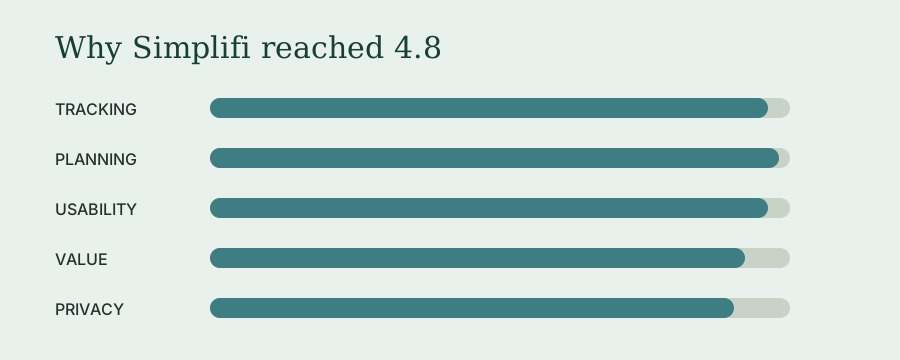
| Category | Weight | Score | Weighted points |
|---|---|---|---|
| Tracking accuracy | 25% | 4.8 | 1.20 |
| Planning tools | 25% | 4.9 | 1.23 |
| Daily usability | 20% | 4.8 | 0.96 |
| Price and value | 15% | 4.6 | 0.69 |
| Privacy and support | 15% | 4.5 | 0.68 |
| Total | 100% | — | 4.76 / 5 |
The best feature is a forecast, not a pie chart
Projected Cash Flow plots expected bills and income against account balances. During our test, it showed that an annual insurance payment and a card autopay would land two days before the second paycheck. The month was solvent overall, but the timing was poor. Moving one payment date prevented a needless transfer from savings. That is better than a retrospective chart: it changes a decision while the decision is still available.
Watchlists are the other quiet strength. A watchlist can follow a merchant, payee, category or tag without forcing that item into a conventional budget. We tracked takeout and work reimbursements this way. The result felt less punitive than a red “over budget” warning and more informative than searching transactions at month-end.
Setup is quick; tuning takes a week
Connecting six institutions took 18 minutes. Simplifi recognized recurring rent, utilities, streaming services and paychecks, but it mistook two irregular transfers for income. Correcting those early matters because recurring items feed the Spending Plan and forecast. Expect twenty focused minutes after setup, then five minutes every few days during the first week.
The mobile apps are clean enough for review and correction, while the browser version is better for reports and larger reorganizations. This cross-platform reach is an important edge over Copilot Money. Our Simplifi vs. Copilot comparison gives Simplifi the narrow win because a household should not have to standardize on Apple hardware to see the same plan.
Price and renewal reality
On August 5, 2026, the official Simplifi page showed a first-year promotion of $2.99 per month, billed annually at $35.88. The stated regular price was $5.99 per month, also billed annually, or $71.88 for a year. Treat the lower number as an introductory offer, not the permanent cost. Quicken changes promotions frequently.
At the regular price, Simplifi is still cheaper than Copilot Money, YNAB and Monarch Money on annual plans. The value case depends on using planning features, not merely importing transactions. Someone who opens the app once a month could get similar awareness from a bank dashboard. Someone checking the forecast weekly receives a more distinctive service.
Who should choose something else?
Envelope-budget devotees may find the Spending Plan too loose. Investment-focused users will see balances, holdings and performance but not the tax-lot depth of dedicated portfolio software. People who refuse subscriptions should use a spreadsheet or a manual app. Couples can share a Simplifi space, but partners who want messages and relationship-first tools should also consider Honeydue.
Copilot Money is the better choice for a single Apple-centered user who prizes interface polish and enjoys reviewing every transaction. It scored 4.5/5 in our Copilot Money review. Simplifi remains the more rounded recommendation: cheaper at regular annual pricing, available through a browser and Android, and better at showing what upcoming commitments do to the month ahead.
For the details that emerged after the scored test, read our unhurried full billing-cycle log.
Frequently asked questions
How much does Quicken Simplifi cost in 2026?
On August 5, 2026, Quicken listed Simplifi at a promotional $2.99 per month, billed annually at $35.88 for the first year. Its stated regular price was $5.99 per month, billed annually. Promotions change, so confirm the renewal price before paying.
Is Quicken Simplifi the same as Quicken Classic?
No. Simplifi is a lighter, cloud-based app for spending, bills, savings goals and net worth. Quicken Classic is desktop-centered and adds deeper investment, tax, property and report features. Simplifi suits people who want a current household view without maintaining a full personal ledger.
Can couples use Quicken Simplifi together?
Yes. Quicken’s Space Sharing feature lets an owner invite another person to a separate financial space without sharing the owner’s Quicken password. It is useful for household budgeting, although permissions and collaboration still feel less central than in apps designed around partners from day one.
Is Quicken Simplifi worth paying for?
For people who will check projected cash flow or the spending plan weekly, yes. Those tools can replace a spreadsheet and catch an overcommitted month early. If you only need balance alerts or manual envelopes, a free option such as Goodbudget may be enough.